
Category: Solutions

  • How to find files on linux OS ( distributions )

    How to find files on linux OS ( distributions )

    find files on linux

    If you are working on Linux OS, finding files effectively always a tricky part.

    Like find files greater than 500 MB, find files which are created 2 days ago, find and delete all files recursively which are greater than specific date.

    Lets learn these simple linux tricks to work with files.

    How to find files or directory in Linux?

    For Files command: 

    find /path/to/directory -name "*.txt" -type f

    For Directory

    find /path/to/directory -name "nameOfDirectory" -type d

    In the above commands only type argument is changed from f to d. f represents for file and d represents for directory.

    How to find files which are greater than specific size?

    find /path/to/directory -type f -size +1024M

    How to find files which are created after number of days?

    find /path/to/directory -mindepth 1 -mtime +5 -size +700M

    How to delete files after finding files?

    Method 1:

    find /path/to/directory -mindepth 1 -mtime +5 -size +700M -delete

    mindepth is for level

    mtime for number of days

    size is for file size greater than or equal to.

    Method 2:

    find . -name "*.done" -type f -print0 | xargs -0 rm -f

    How to find files and set permission to 644 or 664?

    find . -type f -print0 | xargs -0 chmod 0644

    How to find all directory and set permission to 755 or 775?

    find . -type d -print0 | xargs -0 chmod 0755


    This is how you can work with find command. You can always check for man for more arguments.

  • AWS – NDB – Ubuntu – Add separate location for MySQL temporary (tmp) storage

    AWS – NDB – Ubuntu – Add separate location for MySQL temporary (tmp) storage

    aws_mysql_disk_addition

    By default MySQL uses the system default location used for temporary file storage, which is usually /tmp/var/tmp, or /usr/tmp. In Ubuntu its /tmp. It’s good practice to specify separate location for MySQL, if you want to prevent System restart. If tmp location is on separate location then only MySQL restart will needed in case of any disk increase needed in future.

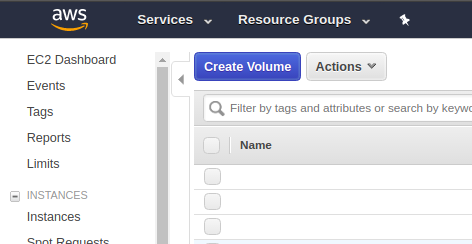
    Step 1: Create new EBS Volume by Login to Console and Click on EC2 Dashboard, then click on “Volumes”

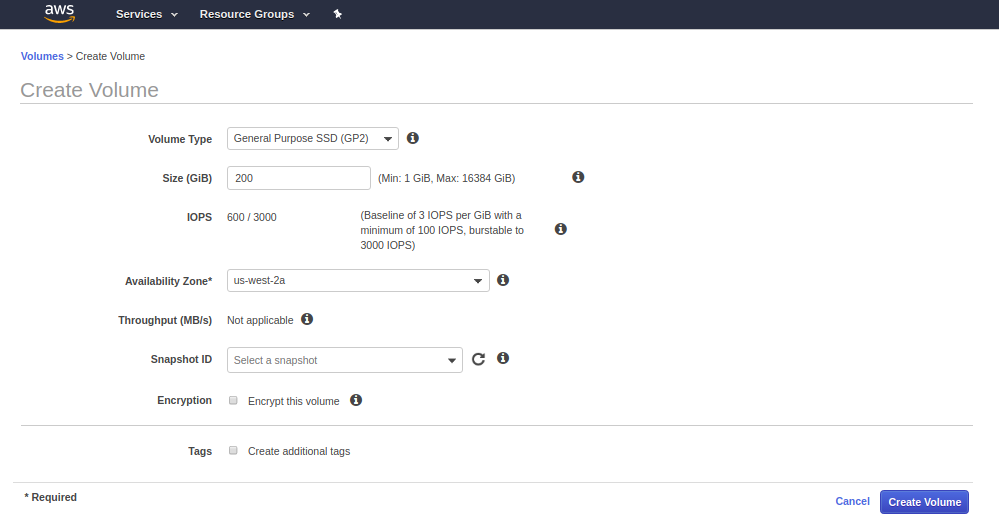
    Step 2: Fill the details of Volume and click on create and the new Volume will be created within few seconds.


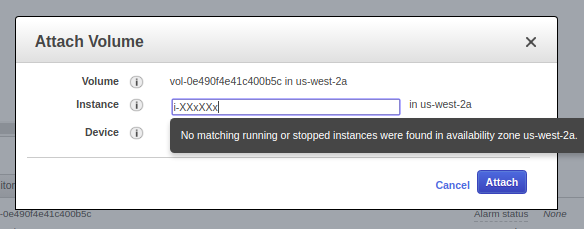
    Step 3: Attach the newly created volume to the Instance.

    Step 4: Check if the volume is attached or not by going to EC2 dashboard and clicking on that particular instance. You can also check by going to Volume stats as well.

    Step 5: Login to machine by your key or password.

    Step 6: Format Volume to ext4 and then mount it and make fstab entry as well.

    root@x:/mnt: lsblk
    NAME    MAJ:MIN RM   SIZE RO TYPE MOUNTPOINT
    xvda    202:0    0    40G  0 disk 
    └─xvda1 202:1    0    40G  0 part /
    xvdb    202:16   0   400G  0 disk /mnt/data
    xvdf    202:80   0   200G  0 disk 
    
    
    root@x: mkfs.ext4 /dev/xvdf
    mke2fs 1.42.9 (4-Feb-2014)
    Filesystem label=
    OS type: Linux
    Block size=4096 (log=2)
    Fragment size=4096 (log=2)
    Stride=0 blocks, Stripe width=0 blocks
    13107200 inodes, 52428800 blocks
    2621440 blocks (5.00%) reserved for the super user
    First data block=0
    Maximum filesystem blocks=4294967296
    1600 block groups
    32768 blocks per group, 32768 fragments per group
    8192 inodes per group
    Superblock backups stored on blocks: 
        32768, 98304, 163840, 229376, 294912, 819200, 884736, 1605632, 2654208, 
        4096000, 7962624, 11239424, 20480000, 23887872
    
    Allocating group tables: done                            
    Writing inode tables: done                            
    Creating journal (32768 blocks): done
    Writing superblocks and filesystem accounting information: done     
    
    
    root@x: mkdir /mnt/xvdf
    root@x:/mnt: sudo mount /dev/xvdf /mnt/xvdf/
    root@x: mkdir /mnt/xvdf/tmp_mysql
    root@x:/mnt/xvdf# chown -Rf mysql:mysql /mnt/xvdf/tmp_mysql
    root@x:/var: ln -s /mnt/xvdf/tmp_mysql/ /var/tmp_mysql
    

    Step 7: Now put the tmp_dir setting in /etc/my.cnf

    [mysqld]
    tmpdir = /var/tmp_mysql
    

    Step 8: Restart the MySQL and check for setting by Login to MySQL and executing below mentioned Query

    root@x:/: sudo service mysql restart


    mysql> SHOW VARIABLES LIKE 'tmpdir';

    This is how you can change the temporary directory in AWS hosted Ubuntu Linux environment.


  • Ubuntu 16.04 – Cisco VPN Client installation

    Ubuntu 16.04 – Cisco VPN Client installation

    cisco_vpn_client

    On Ubuntu 14.04 only sudo apt-get install network-manager-vpnc was working. But for Ubuntu 16.04 you need to install network-manager-vpnc-gnome as well.

    Step 1: Open Terminal
    Step 2: run below command to install the cisco client

    sudo apt-get install network-manager-vpnc network-manager-vpnc-gnome

    Step 3: Click on the “Network Icon” on toolbar, then click “Edit Connections”
    Step 4: Click on “Add” Button
    Step 5: Choose “Cisco Compatible VPN (vpnc)”, click on “Create”
    Step 6: Fill the below details on VPN Tab

    • Gateway: VPN IP 199.229.XXX.XXX
      UserName
    • UserPassword
    • GroupName
    • GroupPassword

    Step 7: Click on Save

    VPN Setup has been completed.

    To connect VPN, click on the Network Icon on toolbar. Click on VPN Connections. Choose the VPN which you have recently created.

    Please make sure, you are on different network to connect VPN.

  • Solution – Apache – SoftException in Application.cpp:388: GID of script “index.php” is smaller than min_gid error

    Solution – Apache – SoftException in Application.cpp:388: GID of script “index.php” is smaller than min_gid error

    apache 500 error

    If you are getting the errors in apache logs like below in cPanel/WHM web hosting

    Error: Apache – SoftException in Application.cpp:388: GID of script “index.php”

    [Mon Oct 02 08:29:33.684683 2017] [core:error] [pid 24787:tid 140323590199040] [client 91.73.173.118:50064] End of script output before headers: index.php
    [Mon Oct 02 08:29:34.812915 2017] [:error] [pid 9068:tid 140323474810624] [client 91.73.173.118:50065] SoftException in Application.cpp:388: GID of script "/index.php" is smaller than min_gid
    [Mon Oct 02 08:29:34.812981 2017] [core:error] [pid 9068:tid 140323474810624] [client 91.73.173.118:50065] End of script output before headers: index.php
    [Mon Oct 02 08:29:34.817808 2017] [:error] [pid 9068:tid 140323474810624] [client 91.73.173.118:50065] SoftException in Application.cpp:388: GID of script "index.php" is smaller than min_gid

    most probably the file user or group ownership has been changed of that file to root.

    root@x.com [directory]# ls -lrt | grep "index.php"
    total 48000
    
    -rw-r--r-- 1 abc_user root         1782 Oct  2 07:10 index.php
    

    Now change the ownership  back to current user is the fix

    Solution: Change the Ownership of file to the  ‘username’ where public_html folder is present.

    Like in /home/abc_user/public_html/ the user will be ‘abc_user

    root@x.com [directory]# sudo chown abc_user:abc_user index.php
    

    This is how you can fix above mentioned problem.

    The above fix will also work for below mentioned error

    Error : Apache Mismatch between target GID (501) and GID (99) of file “index.php”

    [Mon Oct 02 08:30:52.056769 2017] [core:error] [pid 24787:tid 140323474810624] [client 91.73.173.118:51627] End of script output before headers: index.php
    [Mon Oct 02 08:30:52.062511 2017] [:error] [pid 24787:tid 140323474810624] [client 91.73.173.118:51627] SoftException in Application.cpp:456: Mismatch between target GID (501) and GID (99) of file "index.php"
    [Mon Oct 02 08:30:52.062577 2017] [core:error] [pid 24787:tid 140323474810624] [client 91.73.173.118:51627] End of script output before headers: index.php
    [Mon Oct 02 08:30:54.060966 2017] [:error] [pid 24729:tid 140323464320768] [client 154.122.107.180:33276] SoftException in Application.cpp:456: Mismatch between target GID (501) and GID (99) of file "index.php", referer: http://m.facebook.com/


  • Top 3 ways to debug your code while programming

    Top 3 ways to debug your code while programming

    If you do programming, you will definitely face problems with your code and stuck somewhere. That situation is pretty frustrating for beginners. Lets know how to deal with these situations and get the answers of the problem.

    1. Debug your code

    • Check for error messages in the trace log. You will most probably get the line number where the problem is, like missing semicolon, or braces are not closed properly. Most probably you will get something useful piece of information to fix the code.
    • Delete the lines and add one by one until the problem started coming.
    • Print the custom logs on log files and do check them.

    By this time at-least you will know where the problem is.

    2. Find solutions Online in Google or StackOverFlow

    • Paste the error code in Google along with the programming language. You will get the answer in top 5 links provided by google.
    • Make Google your friend – If you don’t know how to do a specific thing, you can always search in Google or StackOverFlow like How to do loop in Java or C.

    3. Ask questions in IRC

    If the Google Searches or StackOverFlow doesn’t solve your problem. Ask the problem in Internet Relay Chat ie. in Freenode.
    Make sure you ask right question with some lines of code pasted on Pastebin, so that others can look into that. Be Thankful to people who helped you while fixing the code.

    If you want to know, how to ask questions smartly follow the below mentioned guide.

     This is how you can fix your problems effectively while doing code. Happy Coding!
  • Solution 2: Algorithm 1

    Solution 2: Algorithm 1

    Algorithm
    Algorithm

    Below is the solution for Algorithm Problem 1

    #include <stdio.h>
    #include <stdlib.h>
    #include <string.h>
    #include <math.h>
    
    #define PI 3.14159265358979323846
    
    float compute_comman_area(double r0,double r1,double x0,double y0,double x1,double y1){
    
         double c,CBA,CAB,CBD,CAD,Area;
    
         //length
         c = sqrt(pow((x1-x0),2) + pow((y1-y0),2));
    
         //IN RADIANS
         CBA = (acos((pow(r1,2) + pow(c,2) - pow(r0,2))/(2*r1*c)));
         CAB = (acos((pow(r0,2) + pow(c,2) - pow(r1,2))/(2*r0*c)));
    
         CBD = 2*CBA;
         CAD = 2*CAB;
    
         Area = (CBD*pow(r1,2) - pow(r1,2)*sin(CBD) + CAD*pow(r0,2) - pow(r0,2)*sin(CAD))/2;
    
         printf("%lf", CBA);
    
         return Area;
    }
    
    int main(){
    
        double r1=10,r0=10,x0=0,y0=0,x1=0,y1=10, Area, Area0;
    
        //getting input
        /*printf("Enter the radius of the first circle\nand the centre point");
        scanf("%lf%lf%lf",&r0,&x0,&y0);
        printf("Enter the radius of the first circle\nand the centre point");
        scanf("%lf%lf%lf",&r1,&x1,&y1);*/
    
        //calling function to compute area
        Area0 = PI * pow(r0, 2) + PI * pow(r1, 2);
        Area = Area0 - compute_comman_area(r0,r1,x0,y0,x1,y1);
    
        //printing the area
        printf("The area thus computed is:%lf",Area);
    
    return 0;
    }
    

    You can download the source file here.

  • Solution Hint: Algorthimic Problem 1st (How to find the shared area of two intersected circle)

    Solution Hint: Algorthimic Problem 1st (How to find the shared area of two intersected circle)

    Algorithm Image
    Algorithm Green Image

    If you will go for the problem statement then you will find that you have to find the Area covered by intersection of two or three circles and the coordinates and radius is given.


    Lets see how to find the shared area between intersection of two circles.

    Let two circles are given.

    1. center(x0,y0), radius (r0)
     2. center(x1,y1), radius (r1)

    Let A be the centre of the circle ( x0, y0 ) and B be the centre of the other circle ( x1,y1 ).

    Draw the circles with appropriate radii r0 and r1 so that there is a reasonable amount of overlap.  The length AB is calculated from the coordinates of the centre:

    AB = sqrt{(x1-x0)^2 + (y1-y0)^2}

    For convenience let this length be denoted by c.

    The two circles intersect in two points which I will label C and D.

    Now we must calculate the angles CAD and CBD, and we do this using the cosine formula. In fact it is half of these angles that we first calculate, using triangle CAB.

    r0^2 = r1^2 + c^2 - 2*r1*c*cos(CBA)
    cos(CBA) = (r1^2 + c^2 - r0^2)/(2*r1*c)

    found CBA, then CBD = 2(CBA).

    Similarly,
    cos(CAB) = (r0^2 + c^2 - r1^2)/(2*r0*c)
    and then
    CAD = 2(CAB)

    Express CBD and CAD in radian measure. Then we find the segment of each of the circles cut off by the chord CD, by taking the area of the sector of the circle BCD and subtracting the area of triangle BCD.
    Similarly we find the area of the sector ACD and subtract the area of triangle ACD.

    Area = ( 1/2 )( CBD ) r1 ^ 2 - ( 1/2 ) r1 ^ 2 * sin( CBD )
      + ( 1/2 )( CAD ) r0 ^ 2 - ( 1/2 ) r0 ^ 2 * sin( CAD )

    Remember that for the area of the sectors you must have CBD and CAD in radians.

    One more thing if the two circles are of the SAME radius please note that the area is symmetrical about the chord CD. Therefore, you only need to find the area in one half of the intersection and multiply by 2.

    A shorter equation is

    Area = 2 * ( ( 1/2 ) ( CBD ) r1 ^ 2 - ( 1/2 ) r1 ^ 2.sin( CBD ) ).

    One more derivation if the redis is equal then you can find out using, this formula
    Area = r^2*(q - sin(q))  where q = 2*acos(c/2r),
    where c = distance between centers and r is the common radius.

    I think now you can solve this. If something goes wrong, then post in the comments.