

By default MySQL uses the system default location used for temporary file storage, which is usually /tmp, /var/tmp, or /usr/tmp. In Ubuntu its /tmp. It’s good practice to specify separate location for MySQL, if you want to prevent System restart. If tmp location is on separate location then only MySQL restart will needed in case of any disk increase needed in future.
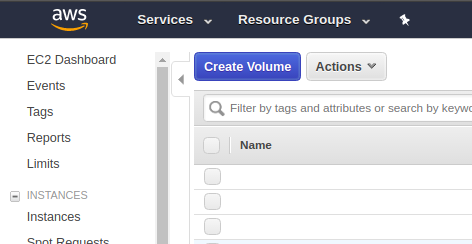
Step 1: Create new EBS Volume by Login to Console and Click on EC2 Dashboard, then click on “Volumes”
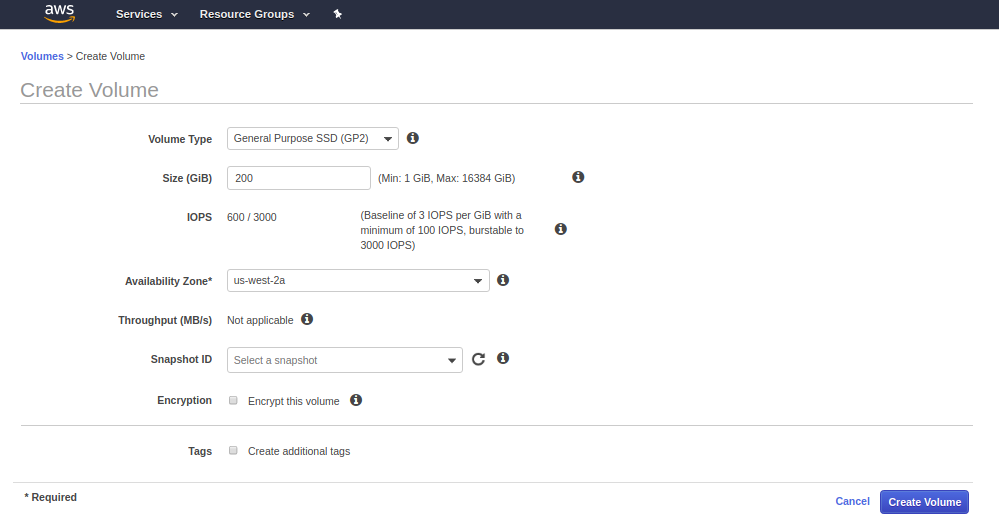
Step 2: Fill the details of Volume and click on create and the new Volume will be created within few seconds.
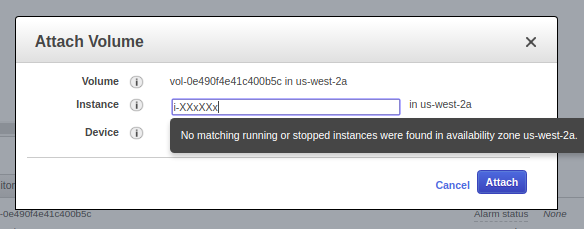
Step 3: Attach the newly created volume to the Instance.
Step 4: Check if the volume is attached or not by going to EC2 dashboard and clicking on that particular instance. You can also check by going to Volume stats as well.
Step 5: Login to machine by your key or password.
Step 6: Format Volume to ext4 and then mount it and make fstab entry as well.
root@x:/mnt: lsblk
NAME    MAJ:MIN RM   SIZE RO TYPE MOUNTPOINT
xvda    202:0    0    40G  0 disk
└─xvda1 202:1    0    40G  0 part /
xvdb    202:16   0   400G  0 disk /mnt/data
xvdf    202:80   0   200G  0 disk


root@x: mkfs.ext4 /dev/xvdf
mke2fs 1.42.9 (4-Feb-2014)
Filesystem label=
OS type: Linux
Block size=4096 (log=2)
Fragment size=4096 (log=2)
Stride=0 blocks, Stripe width=0 blocks
13107200 inodes, 52428800 blocks
2621440 blocks (5.00%) reserved for the super user
First data block=0
Maximum filesystem blocks=4294967296
1600 block groups
32768 blocks per group, 32768 fragments per group
8192 inodes per group
Superblock backups stored on blocks:
    32768, 98304, 163840, 229376, 294912, 819200, 884736, 1605632, 2654208,
    4096000, 7962624, 11239424, 20480000, 23887872

Allocating group tables: done
Writing inode tables: done
Creating journal (32768 blocks): done
Writing superblocks and filesystem accounting information: done


root@x: mkdir /mnt/xvdf
root@x:/mnt: sudo mount /dev/xvdf /mnt/xvdf/
root@x: mkdir /mnt/xvdf/tmp_mysql
root@x:/mnt/xvdf# chown -Rf mysql:mysql /mnt/xvdf/tmp_mysql
root@x:/var: ln -s /mnt/xvdf/tmp_mysql/ /var/tmp_mysql
Step 7: Now put the tmp_dir setting in /etc/my.cnf
[mysqld]
tmpdir = /var/tmp_mysql
Step 8: Restart the MySQL and check for setting by Login to MySQL and executing below mentioned Query
root@x:/: sudo service mysql restart
mysql> SHOW VARIABLES LIKE 'tmpdir';
This is how you can change the temporary directory in AWS hosted Ubuntu Linux environment.