Category: Ubuntu

  • How to get the all the database and table sizes of MySQL or MariaDB?

    How to get the all the database and table sizes of MySQL or MariaDB?

    If you are working with MySQL or MariaDB web server, sooner or later you will be asked what is the size of database or tell me the size of all the database and table sizes.

    You can get the a particular databases tables and indexes size using below mentioned SQL query.

    SELECT 
        table_name AS `Table`, 
        round(((data_length + index_length) / 1024 / 1024), 2) `Size in MB` 
    FROM information_schema.TABLES 
    WHERE table_schema = "$DB_NAME"
        AND table_name = "$TABLE_NAME";

    To get the size of all the databases and tables in MySQL or MariaDB use below query.

    SELECT 
         table_schema as `Database`, 
         table_name AS `Table`, 
         round(((data_length + index_length) / 1024 / 1024), 2) `Size in MB` 
    FROM information_schema.TABLES 
    ORDER BY (data_length + index_length) DESC;

    This is how you can get all the tables and databases sizes in MySQL. You can later pivot the records to get the cumulative sizes of all the databases in MS Excel or Libreoffice.

  • How to set or change default text editor for crontab in Linux?

    How to set or change default text editor for crontab in Linux?

    To edit the crontab entries you use crontab -e. The command will check for the environment variables $EDITOR or $VISUAL.

    So you need to set the  $EDITOR or $VISUAL variable. Let’s learn how to do that.

    To Set the default editor to (Vim) for crontab editing

    $ export VISUAL=vim
    
    or
    
    $ export EDITOR=vim
    
    Then
    $ crontab -e

    To set the default editor to (nano) for crontab editing

    $ export VISUAL=nano

    To set the default editor to (ed) for crontab editing

    $ export VISUAL=ed

    to exit from ed you need to type q and press enter.

    This is how you can set the default editor for crontab in linux.


  • How to install Comodo SSL certificate with NGNIX web server?

    How to install Comodo SSL certificate with NGNIX web server?

    Installation method for COMODO SSL Certificate

    comodo_ssl_installation

    If you have generated the CSR and purchased or renewed the SSL with Comodo, you might have noticed that, the comodo has sent you 4 files instead of 1 one file.


    AddTrustExternalCARoot.crt - This is root CA Certificate
    
    COMODORSAAddTrustCA.crt - Intermediate CA Certificate
    
    COMODORSAOrganizationValidationSecureServerCA.crt - This is also intermediate 
    CA certificate
    
    domain_name_com.crt - The domain/ Sub Domain name you have provided while generating CSR>
    

    You need to concat the content of those file in specific order. The order is

    domain_name.crt
    COMODORSAOrganizationValidationSecureServerCA.crt
    COMODORSAAddTrustCA.crt
    AddTrustExternalCARoot.crt

    You can simply open your favourite text editor to do that or if you are working with linux, you can simply use linux cat command to do that.

    surya >>/$ cat domain_name.crt COMODORSAOrganizationValidationSecureServerCA.crt  COMODORSAAddTrustCA.crt AddTrustExternalCARoot.crt > domain_name_combined.crt

    Now upload the combined or bundled ssl certificate to the location where nginx can find that.

    mkdir -p /etc/nginx/ssl/domain_name_com/
    scp domain_name_combined.crt user@host:/etc/nginx/ssl/domain_name_com/

    Move the private key to the same folder which you have generated while generating CSR.

    mv domain_name_com.key /etc/nginx/ssl/domain_name_com/

    Now edit the nginx conf and make an entry for SSL certificate

    server {
        listen 443;
    
        ssl on;
        ssl_certificate /etc/nginx/ssl/domain_name_com/domain_name_combined.crt;
        ssl_certificate_key /etc/nginx/ssl/domain_name_com/domain_name_com.key;
    
        ssl_protocols TLSv1 TLSv1.1 TLSv1.2;
    
        # Rest of the conf ...
    
    }

    Now check for the nginx configuration is valid or not? if valid then reload the nginx conf. Make a practice of validating nginx conf before reloading or restarting nginx.

    surya@x ~/$ sudo nginx -t
    nginx: the configuration file /etc/nginx/nginx.conf syntax is ok
    nginx: configuration file /etc/nginx/nginx.conf test is successful
    
    surya@x ~/$ sudo service nginx reload
    

    Now validate the SSL is installed correctly or not by online tools. like below

    https://sslanalyzer.comodoca.com/

    This is how you can install the Comodo SSL on nginx.

  • How to find files on linux OS ( distributions )

    How to find files on linux OS ( distributions )

    find files on linux

    If you are working on Linux OS, finding files effectively always a tricky part.

    Like find files greater than 500 MB, find files which are created 2 days ago, find and delete all files recursively which are greater than specific date.

    Lets learn these simple linux tricks to work with files.

    How to find files or directory in Linux?

    For Files command: 

    find /path/to/directory -name "*.txt" -type f

    For Directory

    find /path/to/directory -name "nameOfDirectory" -type d

    In the above commands only type argument is changed from f to d. f represents for file and d represents for directory.

    How to find files which are greater than specific size?

    find /path/to/directory -type f -size +1024M

    How to find files which are created after number of days?

    find /path/to/directory -mindepth 1 -mtime +5 -size +700M

    How to delete files after finding files?

    Method 1:

    find /path/to/directory -mindepth 1 -mtime +5 -size +700M -delete

    mindepth is for level

    mtime for number of days

    size is for file size greater than or equal to.

    Method 2:

    find . -name "*.done" -type f -print0 | xargs -0 rm -f

    How to find files and set permission to 644 or 664?

    find . -type f -print0 | xargs -0 chmod 0644

    How to find all directory and set permission to 755 or 775?

    find . -type d -print0 | xargs -0 chmod 0755


    This is how you can work with find command. You can always check for man for more arguments.

  • How to create CSR ( Certificate Signing Request  ) for new SSL or to renew SSL?

    How to create CSR ( Certificate Signing Request ) for new SSL or to renew SSL?

    What is SSL?

    SSL (Secure Sockets Layer) is a standard security protocol for establishing encrypted connection between a web server and client browser in communication.

    The usage of SSL technology ensures that all data transmitted between the web server and clients browser remains encrypted.

    To get the SSL from Certificate Authorities, you must need to provide the CSR to them and Certificate Authorities will sign the certificate provided by you. CSR contains the information related to Country, State, Locality, Organisation, Organisation Unit, Common Name – Domain Name and email address as well as public key.

    Let’s learn how to generate the CSR?

    Step 1: Generate the private key first. If you are renewing the SSL this step is not required. To generate the private key use below mentioned command.

    surya@x ~/ » openssl genrsa -out blog.suryaelite.com.key 4096
    
     1 ↵
    Generating RSA private key, 4096 bit long modulus
    ................................++
    .........++
    e is 65537 (0x010001)

    2048 or higher bit private key recommended. I have used 4096 bit.

    Step 2: Now generate the CSR by using below command.


    surya@x ~/ » openssl req -new -key blog.suryaelite.com.key -out blog.suryaelite.com.csr 
    
    
    You are about to be asked to enter information that will be incorporated
    into your certificate request.
    What you are about to enter is what is called a Distinguished Name or a DN.
    There are quite a few fields but you can leave some blank
    For some fields there will be a default value,
    If you enter '.', the field will be left blank.
    -----
    Country Name (2 letter code) [AU]:IN
    State or Province Name (full name) [Some-State]:HR
    Locality Name (eg, city) []:Gurgaon
    Organization Name (eg, company) [Internet Widgits Pty Ltd]:SuryaElite
    Organizational Unit Name (eg, section) []:blog
    Common Name (e.g. server FQDN or YOUR name) []:blog.suryaelite.com 
    Email Address []:surya@suryaelite.com
    
    Please enter the following 'extra' attributes
    to be sent with your certificate request
    A challenge password []:
    An optional company name []:Surya Elite Pvt. Ltd.
    

    Now you will have two files, one is private key and second one is CSR. Not you need to send the CSR file to Certificate Authority and then Certificate Authority will sign the Certificate and send you the Certificate.

    Now you need to apply the SSL to the web server you are using NGINX or Apache. So this is how you can generate the CSR File.

  • How to decode CSR (Certificate Signing Request) ?

    How to decode CSR (Certificate Signing Request) ?

    What is CSR?

    Certificate Signing Request
    Certificate Signing Request is encrypted piece of code which is going to used for generating the SSL Certificate for your domain name.


    CSR contains the information about Country, State, Location, Organisation Name, Common Name ie Domain Name , Email Address and Public Key.

    Lets see how to extract the information from the CSR file?

    How to extract information from the CSR?

    surya@x ~/ » openssl req -in blog.suryaelite.com.csr -text -noout

    How to verify the signature of CSR?

    surya@x ~/ » openssl req -in blog.suryaelite.com.csr -noout -verify

    To which company certificate is issued to?

    surya@x ~/ » openssl req -in blog.suryaelite.com.csr -noout -subject

    How to extract Public Key from CSR?

    surya@x ~/ » openssl req -in blog.suryaelite.com.csr -noout -pubkey

    This is how you can extract the various information from the CSR file.

  • AWS – NDB – Ubuntu – Add separate location for MySQL temporary (tmp) storage

    AWS – NDB – Ubuntu – Add separate location for MySQL temporary (tmp) storage

    aws_mysql_disk_addition

    By default MySQL uses the system default location used for temporary file storage, which is usually /tmp/var/tmp, or /usr/tmp. In Ubuntu its /tmp. It’s good practice to specify separate location for MySQL, if you want to prevent System restart. If tmp location is on separate location then only MySQL restart will needed in case of any disk increase needed in future.

    Step 1: Create new EBS Volume by Login to Console and Click on EC2 Dashboard, then click on “Volumes”
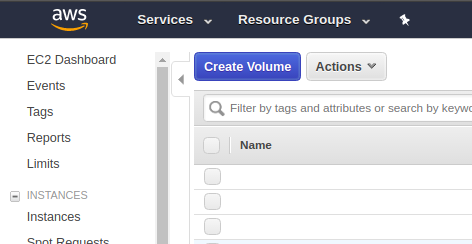
    Step 2: Fill the details of Volume and click on create and the new Volume will be created within few seconds.
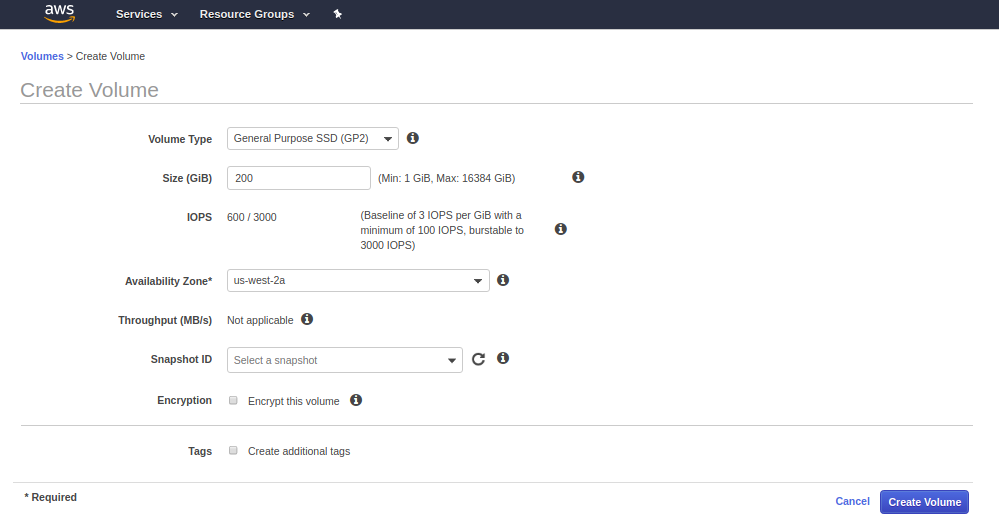
     

    Step 3: Attach the newly created volume to the Instance.
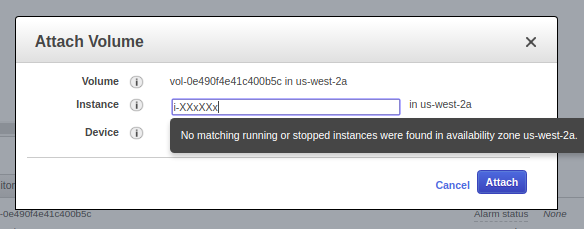
    Step 4: Check if the volume is attached or not by going to EC2 dashboard and clicking on that particular instance. You can also check by going to Volume stats as well.

    Step 5: Login to machine by your key or password.

    Step 6: Format Volume to ext4 and then mount it and make fstab entry as well.

    root@x:/mnt: lsblk
    NAME    MAJ:MIN RM   SIZE RO TYPE MOUNTPOINT
    xvda    202:0    0    40G  0 disk 
    └─xvda1 202:1    0    40G  0 part /
    xvdb    202:16   0   400G  0 disk /mnt/data
    xvdf    202:80   0   200G  0 disk 
    
    
    root@x: mkfs.ext4 /dev/xvdf
    mke2fs 1.42.9 (4-Feb-2014)
    Filesystem label=
    OS type: Linux
    Block size=4096 (log=2)
    Fragment size=4096 (log=2)
    Stride=0 blocks, Stripe width=0 blocks
    13107200 inodes, 52428800 blocks
    2621440 blocks (5.00%) reserved for the super user
    First data block=0
    Maximum filesystem blocks=4294967296
    1600 block groups
    32768 blocks per group, 32768 fragments per group
    8192 inodes per group
    Superblock backups stored on blocks: 
        32768, 98304, 163840, 229376, 294912, 819200, 884736, 1605632, 2654208, 
        4096000, 7962624, 11239424, 20480000, 23887872
    
    Allocating group tables: done                            
    Writing inode tables: done                            
    Creating journal (32768 blocks): done
    Writing superblocks and filesystem accounting information: done     
    
    
    root@x: mkdir /mnt/xvdf
    root@x:/mnt: sudo mount /dev/xvdf /mnt/xvdf/
    root@x: mkdir /mnt/xvdf/tmp_mysql
    root@x:/mnt/xvdf# chown -Rf mysql:mysql /mnt/xvdf/tmp_mysql
    root@x:/var: ln -s /mnt/xvdf/tmp_mysql/ /var/tmp_mysql
    

    Step 7: Now put the tmp_dir setting in /etc/my.cnf

    [mysqld]
    tmpdir = /var/tmp_mysql
    

    Step 8: Restart the MySQL and check for setting by Login to MySQL and executing below mentioned Query

    root@x:/: sudo service mysql restart


    mysql> SHOW VARIABLES LIKE 'tmpdir';

    This is how you can change the temporary directory in AWS hosted Ubuntu Linux environment.