Blog

  • Linux – How to set default version of PHP in Ubuntu 16.04

    Linux – How to set default version of PHP in Ubuntu 16.04

    It might be possible you have installed multiple version of PHP in you server or system. First you should list all the php version and check which version is set to default. After that set the preferred PHP version.

    How to list number of Php version in the system?

    To list PHP version use sudo update-alternatives --display php

    surya@x:$ sudo update-alternatives --display php
    php - manual mode
      link best version is /usr/bin/php7.1
      link currently points to /usr/bin/php5.5
      link php is /usr/bin/php
      slave php.1.gz is /usr/share/man/man1/php.1.gz
    /usr/bin/php5.5 - priority 55
      slave php.1.gz: /usr/share/man/man1/php5.5.1.gz
    /usr/bin/php5.6 - priority 56
      slave php.1.gz: /usr/share/man/man1/php5.6.1.gz
    /usr/bin/php7.0 - priority 70
      slave php.1.gz: /usr/share/man/man1/php7.0.1.gz
    /usr/bin/php7.1 - priority 71
      slave php.1.gz: /usr/share/man/man1/php7.1.1.gz
    

    How to check current default Php version in server?

    To check current default version use command php -v

    surya@x:$ php -v
    PHP 5.5.38-4+deb.sury.org~xenial+1 (cli) 
    Copyright (c) 1997-2015 The PHP Group
    Zend Engine v2.5.0, Copyright (c) 1998-2015 Zend Technologies
        with Zend OPcache v7.0.6-dev, Copyright (c) 1999-2015, by Zend Technologies
    

    How to set default Php version in server?

    To set default version of PHP use sudo update-alternatives --config php

    surya@x:$ sudo update-alternatives --config php
    There are 4 choices for the alternative php (providing /usr/bin/php).
    
      Selection    Path             Priority   Status
    ------------------------------------------------------------
      0            /usr/bin/php7.1   71        auto mode
    * 1            /usr/bin/php5.5   55        manual mode
      2            /usr/bin/php5.6   56        manual mode
      3            /usr/bin/php7.0   70        manual mode
      4            /usr/bin/php7.1   71        manual mode
    
    Press <enter> to keep the current choice[*], or type selection number: 2       
    update-alternatives: using /usr/bin/php5.6 to provide /usr/bin/php (php) in manual mode
    
    
    surya@OMDELPDNEOUBU:/etc/nginx/sites-available$ php -v
    PHP 5.6.31-4+ubuntu16.04.1+deb.sury.org+4 (cli) 
    Copyright (c) 1997-2016 The PHP Group
    Zend Engine v2.6.0, Copyright (c) 1998-2016 Zend Technologies
        with Zend OPcache v7.0.6-dev, Copyright (c) 1999-2016, by Zend Technologies
    

    This is how, you can set your preferred version of Php to the system.

  • Php: How to prevent from XSS Attacks

    Php: How to prevent from XSS Attacks

    xss attack and hackingData contains HTML or JavaScript can cause a really big Problem, which is being entered by user.
    Let us take an example of a simple application like Blog, where user can submit the comments after reading the article, which are being displayed. If the user is good and behaves nicely and enters only plain text, then it has no problem. Let’s imagine if the user submit the data
    <b><i>This is a sample comment!!!!</i></b>

    What will happen? The situation gets complicated. Browsers are not going to tell the difference between HTML tags which are displaying from Blog, it will be embedded in the comments.

    It is still good if the user close the HTML tags, like in above code. All the HTML codes are closed properly. Imagine the situation if it not properly closed. Now the situation will be getting extreme bad, it will cause the browser to prevent page being displayed correctly. Like if someone submits

    <b> or </b>
    

    The situation will be worse if it contains Java Script. Then you will feel the power of Javascript, a malicious hacker can steal your cookies to his inbox, can redirect your pages to another web page, can steal your password which are saved in the browser. A lot of thing can be done by Javascript.

    These kinds of problem are called XSS (Cross Site Scripting) attack.

    If you want to remain safe from XSS then you need to code nicely as well as intelligently then you need to never display the direct input from the user. You need to remove the HTML tags first before displaying in the site.

    But you will feel good to know, Php gives you two functions to remove the HTML tags or encode the special characters.
    1. strip_tags() : It will removes the HTML tags from the string
    2. htmlentities() : It will encode the special HTML characters.

    Let’s see the how to use those functions:

    //Remove the HTML to comments
     $comment = strip_tags($_POST['comment']);
     print $comment;

    if the ($_POST['comment']) have

    <b>Hi..</b> Your</pre>
     <div class="heading1">article</div>
     <pre>
     is <i>awesome.</i>

    it will display simply.
    Hi.. Your article is awesome.

    Now let’s see the of htmlentities function:

    //Remove the HTML to comments
     $comment = htmlentities($_POST['comment']);
     print $comment;

    if the ($_POST['comment']) have

    <b>Hi..</b> Your</pre>
     <div class="heading1">article</div>
     <pre>
     is <i>awesome.</i>

    It will display.

    <b>Hi...</b> Your</pre>
     <div class="heading1">article</div>
     <pre>
     is <i&gt awesome. &lt/i&gt

    The character has been changed.

    Now the browser will not display the page correctly.

    You also need to put a default value to being prevented form XSS.
    Make an array of default value. See in the example

     if ($_POST['_submit_check']){
     $default = $_POST;
     }
     else {
     $default = array('name' => 'abc',
     'email' => 'abc@abc.com',
     'web' => 'www.google.com',
     'content' => 'xyz');
     }


    See how to set the default value in multiline text area.

     print '<textarea name="comment">';
     print htmlentities($defalut['comment']);
     print '</textarea>';

    This is how we can prevent of being XSS.

  • Google Pacman (Source Download)

    Google Pacman (Source Download)

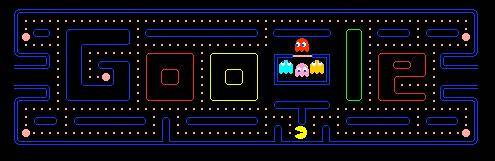
    Day before yesterday Google celebrated 30th anniversary of PAC-MAN. Might you have been noticed the change in Google Doodle, its just special…

    You can view the pic below.

    Google Pack man Image
    Google Pacman Game Source

    The special thing is that you can play the hackers favourite game on its doodle. You have to click on that and the game will start.

    Many of the user liked it, so google make this permanent. You can access this page simply typing six more characters after www.google.com that is /pacman

    www.google.com/pacman

    I liked it, as many of person saying that its a wastage of time and money. I think that’s a creativity. Thanks Google!! showing new way of creativity.

    Now if you liked, then you want to save this. One thing to note down, simply saving the page won’t work. This PAC-MAN is simply written in JAVA Script.

    You can download the source by clicking here.

    This doodle is open source by macek on GITHUB. You can alternatively download the latest version from there. The link is provided below.

    http://github.com/macek/google_pacman

    Happy Sharing!!

  • Heart Purely Vectorised : using Adobe Illustrator

    Heart Purely Vectorised : using Adobe Illustrator

    I had just created a Heart using vector in Adobe Illustrator. 🙂

    This is what it looks like.

    Heart Vector SVG AI
    Heart Vector

    You can download the Adobe Illustrator source file from here. Anyone can use the creative.

  • Finding Rank of a Word: With Repetition

    Finding Rank of a Word: With Repetition

    Rank of word
    Rank of a word

    In the previous tutorial, we learn how to find the rank of a word, if the letters are having no repetition. Now lets learn how to find the rank of word, if the letters in a word having repetition.

    Before proceeding to the tutorial: we should know, how to calculate the total number of words can be formed using letters of a word is the letters are repeating in nature.

    Like how many words can be formed using letters of INDIA. In letter “INDIA” there are 2 I and no other letter is repeating. So the number of words that can form using letter of INDIA will be 5 ! / 2 ! = 60.

    Now we may proceed with new learning.

    Algorithm

    1. First take that word which we have to find the rank and the letters are repeating in nature. I will take “BOMBAY.”

    2. Now arrange the letter of ” BOMBAY ” in alphabetical order. Now they are “ABBMOY”.

    3. Pickup first letter from “ABBMOY” that’s “A”. Now compare “A” from “BOMBAY”. Does the letter “A” in the first we want? NO. Now how many words can be made if we extract “A” from “ABBMOY”.

    A = 5! / 2! = 60

    Now proceed to the next.

    4. Pickup second letter from “ABBMOY” that’s “B”. Now compare “B” from “BOMBAY”. Does the letter “B” in the first we want? Yes. Now fix the letter “B”.

    [ B ]

    Then go to once again on the first letter of “ABBMOY”. Does “A” we want? NO. Then write down how many words can be made with starting [ B ] A

    [ B ] A = 4! = 24

    5. Repeat the process until we get the letter which we want after B in the word “BOMBAY”.

    [ B ] B = 4! = 24
    [ B ] M = 4! = 24

    [ B ] O. “O” we want. So fix this and get back to the starting.

    6. Does we want now [ B O ] A? NO. So write down once again.

    [ B O ] A = 3! = 6
    [ B O ] B = 3! = 6

    [ B O ] M. “M” we want now. So fix this too. And get back to the starting.

    7. Does we want [ B O M ] A? No. So write down once again.

    [ B O M ] A = 2! = 2

    [ B O M] B. “B” we want. So fix this too. And get back to starting. We see “A” also we want now. So fix this too. And the last letter is “Y” We also want this. So we reach to the end. Now we can write.

    [ B O M B A Y ] = 1.


    8. Now add the entire sum which we earn.
    That’s 60 + 24 +24 + 24 + 6 + 6 + 2 + 1 = 147. That’s the answer.

    Now for Word “INDIA

    1. [ A D I I N ]
    2. A = 4! / 2! = 12
    2. D = 4! / 2! = 12
    3. [ I ] A = 3! = 6
    4. [ I ] D = 3! = 6
    5. [ I ] I = 3! = 6
    6. [ I N ] A = 2! =2
    7. [ I N D ] I A = 1.

    Now add all.

    12 + 12 + 6 + 6 + 6 + 2 + 1 = 45.

    So that’s the answer. Congratulation now you are able to find RANK of any word if its letters are repeating in nature.

  • Mahatma Gandhi Sketch: in Illustrator (vector)

    Mahatma Gandhi Sketch: in Illustrator (vector)

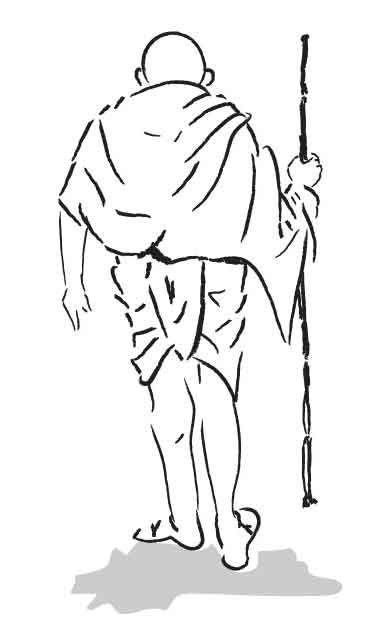
    I just created a sketch of our father of nation Mahatma Gandhi in Adobe Illustrator.

    The preview in JPG file is given below.

    Mahatma Gandhi Sketch
    Mahatma Gandhi Sketch Illustraion

    You can download the source file from here.

  • Finding Rank of a Word. (No Repetition)

    Finding Rank of a Word. (No Repetition)

    Finding the rank of a word
    Finding the rank of a word

    Lets first, we should know what is the RANK of a word?

    Rank of a word is the position of that word from the arrangement of letters of that given word in dictionary order. Lets see an example…this can help more in understanding the RANK of a word. Its really interesting to find rank of Word.


    Lets took word “RANK

    1. How many words, can be created  using the letters of word RANK? Ans: The number of characters in word “RANK” is 4. So it will be 4! = 4*3*2*1 = 24.
    2. Now if we arrange all the 24 words formed by the letters of “RANK” in dictionary order.
    3. Then at what postion the the word “RANK” will exist?
    4. That particular position of the word, will be the rank of word “RANK”.

    Algorithm 1st:

    1. Take a word which we have to find the rank. I will take “SUNIL”.
    2. Now arrange the letter of “SUNIL” in alphabatical order.
      It will be. “I L N S U“.
    3. Now take the first letter. Its “I”. Now check, Is the letter “I” is the first letter of “SUNIL”? No.
      So the no. of word found can be formed with I will be 4!. I = 4! = 24
    4. Now go for the second letter. Its “L”. Now check once again is this letter we want in first? No.
      So. the no. of words can be formed using “L” at first will be 4!.
      L = 4! = 24
    5. Now go for “N”. Is this we want? No. Write down the number of words can be formed using word. “N” is once again 4!N = 4! = 24
    6. Now go for “S”. Is this is what we want? Yes. Now cut the letter from the alphabetically ordered word. it will be now. “I L N S U”
      Write S and check the word once again in the list.
      Is we want SI? No. so the number of words can be formed using SI at first will be. 3! [S] : I -> 3! = 6
    7. Go for L. is we want SL? No. so it will be 3!. [S] : L ->  3! = 6
    8. Go for N. is we want SN? No. [S] : N ->  3!  =  6
    9. Go for SU. Is this we want? Yes cut the word U from the list and then it will be “I L N S U.
      Now Go for I. is we want SUI? no. so the no of word can be formed which starts from SUI will be 2! Now [SU] : I -> 2! = 2
    10. Now go for L. is we want SUL. No. so the no. of words. can be formed. SUL will be 2!. [SU] : L -> 2! = 2
    11. Now go for N. Is we want SUN? Yes now cut that letter. and this will be “I L N S U Is we want SUNI yes. cut that word. Then only one letter will be left.”L”.
    12. Now go for L. Is we want SUNIL yes. SUNIL words having only 1!.
    13. [SUN][I][L] = 1! = 1

    Now add the whole numbers we get. The sum will be.

    24 + 24 + 24 + 6 + 6 + 6 + 2 + 2 + 1 = 95.

    So the word SUNIL will be at 95th position if we form the whole words that can be created using the letters of SUNIL arranged in dictionary order.

    Lets check the rank of SURYA now.

    1. A R S U Y//Arranged in Alphabatical Order.
    2. A = 4! = 24 // Is A We want? No.
    3. R = 4! = 24// Is R? No.
    4. [S]:A-> 3! = 6 // Is S? Yes. Cut the word S from that list. And move to next letter. Is SA? No.
    5. [S]:R-> 3! = 6 // IS SR? No.
    6. [SU]:A-> 2! =2 //Is SU? Yes. Cut the word U from that list. And move to next letter. IS SUA? No.
    7. [SUR]:A-> 1! = 1 // Is SUR? Yes. Cut the word A From that list.
    8. [SURY][A] = 1!= 1 //Is SURY? Yes. Cut Y. Only one letter is now left “A” That will be last. Is “SURYA”? Yes.

    Now sum all that. 24 + 24 + 6 + 6 + 2 + 1 + 1 = 64.

    Shortcut Method to Find the Rank of WORD
    ( No Repetition )

    Algorithm 2nd:

    Take the Word “SURYA” once again.

    1. A R S U Y // Alphabatcal Order
    2. 2 * ( 4 ! ) = 48// Search for S. Remove that word from the list and see how many letter before S? 2 letter.
    3. 2 * ( 3 ! )  = 12 // Search for U. Remove that letter and count the letters before U now. Its 2.
    4. 1 * ( 2 ! )  = 2 // Search for R. Remove that letter and count the letters before R. Its 1.
    5. 1 * ( 1 ! )  =  1// Search for Y. Remove that letter and count the letter before Y. Its 1.
    6. Add the whole numbers. and add 1 for last letter A.
    7. Sum: 48 + 12+ 2 + 1 + 1 = 64.

    That’s all. So here we see how to find the rank of word if the word has no repetition. In the next post I will tell how to find the rank of a word if the word had repetition like in the case of INDIA. “I” is repeated  2 times.

    Edit: Link of Finding Rank in Repetition